2026-11-12 · AI Manga Translator
How to Translate Manga to English: A Step-by-Step Guide with Real Pages
Translate raw Japanese manga pages to English with AI: prepare your scans, upload, pick a translation style, add a glossary for names, and download pages with the English lettered inside the bubbles.
To translate manga to English, you need three things done to every page: read the Japanese text (including vertical text), translate it in context, and put the English back inside the speech bubbles without damaging the art. An AI manga translator does all three in one pass. This guide walks through the whole process on real pages and shows where you still need to check the result yourself.
The short answer
- Scan or save the raw pages as JPG, PNG or WebP images.
- Upload them to AI Manga Translator and choose English.
- Pick a translation style: Standard for natural English, Keep honorifics if you want -san and -senpai, or Faithful for a scanlation-style read.
- Add character names to the Glossary so they are spelled the same on every page.
- Translate, compare each page with the original using the slider, and download the pages one by one or as a ZIP.
The rest of this guide explains each step and what to look out for.
What happens to a manga page during translation
A manga page is an image, not a text document, so translation tools that only handle text (or a general chatbot you paste text into) leave you with a list of lines and no finished page. A manga translator works on the page itself:
- Text detection finds every speech bubble, caption and line of text drawn on the art.
- OCR reads the Japanese, including vertical text that runs top to bottom and right to left.
- Translation turns the whole page into English at once, so names, pronouns and tone stay consistent between bubbles.
- Clean-up erases the original lettering and repairs the art behind it.
- Typesetting fits the English back into each bubble, sized and wrapped to fit.
You can read more about each stage in How AI manga translation works, step by step.
Step 1: Prepare clean page images
Translation quality starts with the scan. Before you upload:
- Use the largest version you have. Pages around 1,200–2,000 pixels tall give the OCR enough detail to read small furigana-free text. Thumbnails and compressed screenshots cause misread characters.
- Keep one page per image. If you have a two-page spread, it can stay as one image, but cropping away browser bars, ads or page numbers helps detection.
- Straighten crooked scans. Text detection works best when lines are roughly vertical or horizontal.
- Name files in reading order (001.jpg, 002.jpg…) so the pages stay in order when you group them into a book later.
Each image can be up to 10 MB, and you can upload up to 20 pages at a time.
Step 2: Upload and choose English
Drop the pages onto the translator, click to choose files, or paste an image from your clipboard. Under Translate into, choose English. You don't need to set the source language: Japanese, Korean, Chinese and English text is detected automatically.
Step 3: Choose a translation style
English manga translations have long split readers into two camps, and the right style depends on how you like to read:
| Style | What you get | Illustrative line |
|---|---|---|
| Standard | Natural English, honorifics dropped or rephrased | "Hey, Tanaka, wait up!" |
| Keep honorifics | Natural English that keeps -san, -kun, -chan, -senpai | "Hey, Tanaka-senpai, wait up!" |
| Faithful | Scanlation style: honorifics and Japanese terms kept, nothing shortened | "Tanaka-senpai! I made you a bento!" |
If you're not sure, use Try all three styles. It translates each page in all three styles side by side and still uses one page credit per page, so you can pick the one you prefer before translating a whole chapter. We compare the styles on a real page in Manga Honorifics and Translation Styles.
Step 4: Add names to the glossary
Names are where machine translation slips most often: the same character can come out as "Sakura" on one page and "Cherry Blossom" on the next, or a family name can be translated as a word. Open Glossary → Add terms and enter each name or recurring term with the spelling you want, for example:
- 坂本 → Sakamoto
- さくら → Sakura
- 生徒会 → Student Council
The glossary is used on every page you translate, so a whole chapter keeps the same spellings.
Step 5: Translate, compare and download
Press Translate. Each page usually takes well under a minute; the first page after a quiet period can take a couple of minutes while the translation server starts. When a page is done, drag the slider to compare the original with the English, and check the lines that matter most to the story.
Here is a real page before and after translation to English:
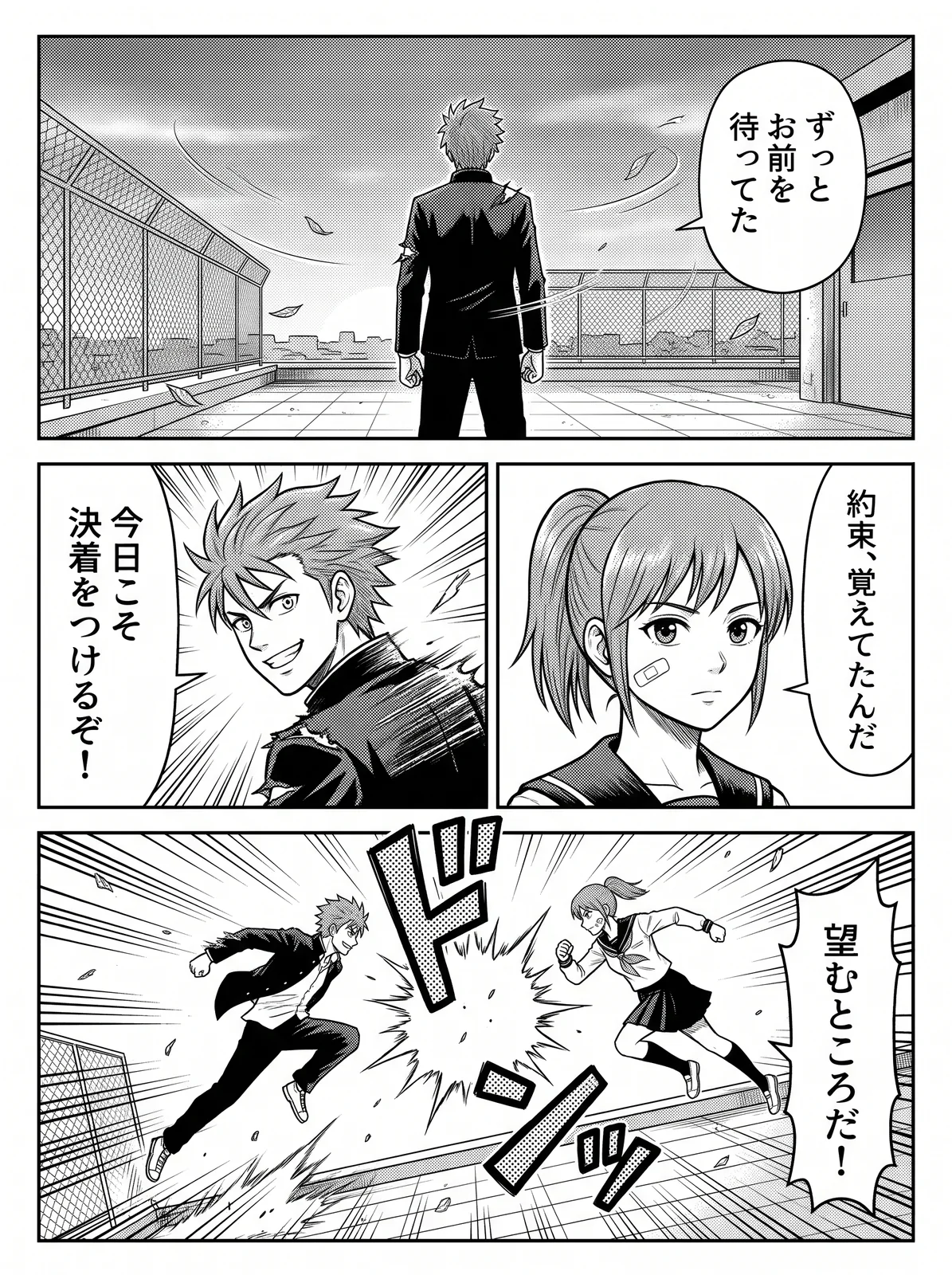
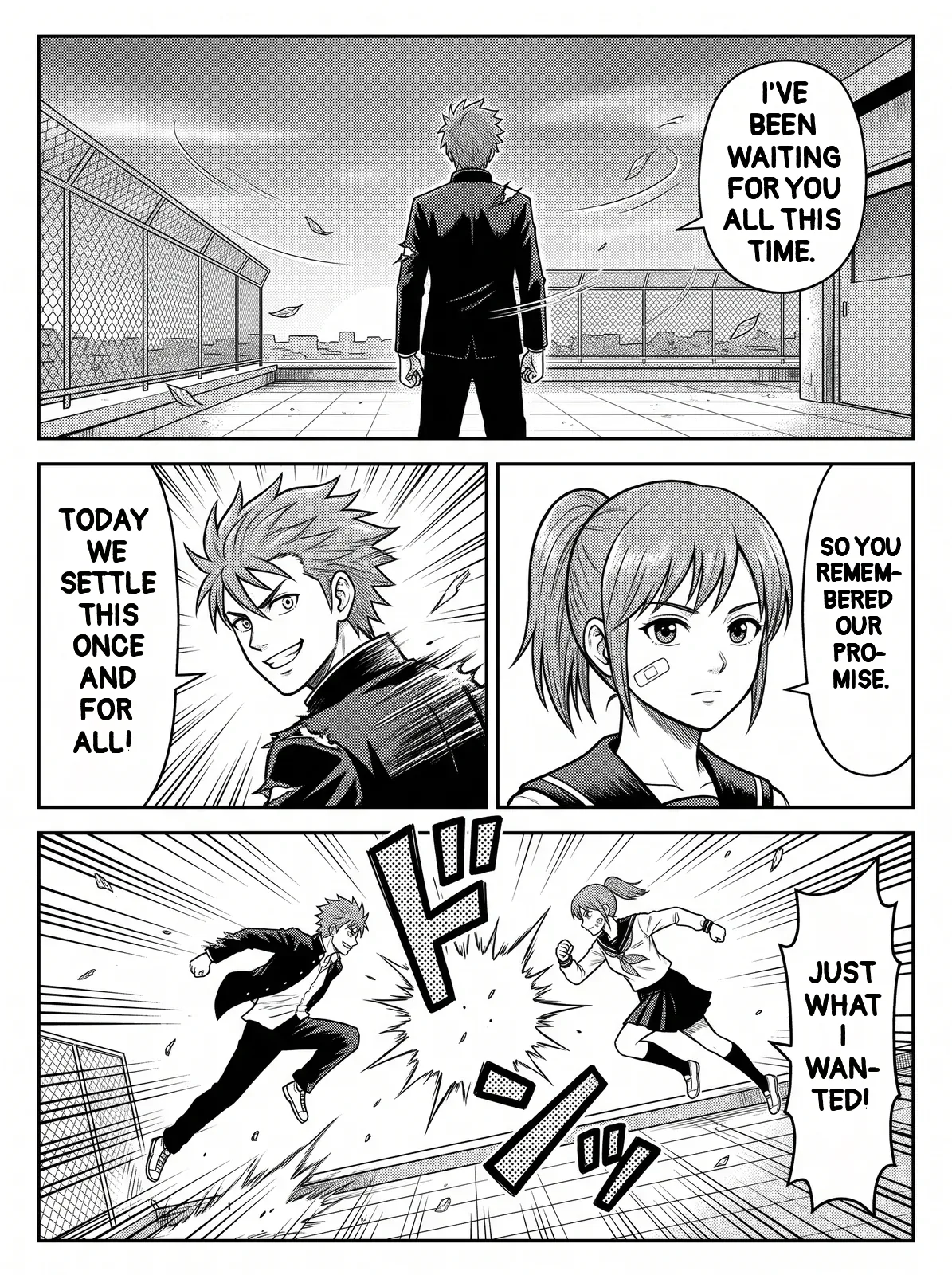
All translated pages are saved in My pages. You can group them into a book, read them in order, and download a single page as PNG or a whole book as a ZIP.
Tips for cleaner English results
- Check names and invented terms first. If a name comes out wrong once, add it to the glossary and translate the page again.
- Read the page as a whole. Short lines like "Huh?" or "No way…" depend on the surrounding panels. If a line feels off, the context is usually on the previous page.
- Pick a lettering font. The default Manga font is a condensed comic hand that fits narrow bubbles best; Standard and Handwritten are alternatives. How the text is fitted is explained in Manga Typesetting.
- Expect sound effects to stay as drawn. Stylized sound effects (ドドド, バン) are part of the art and are usually left in Japanese. Dialogue, narration and captions are translated.
- Very small or decorative text may be skipped. Signs in the background, handwritten notes and text over busy screentone are the hardest for any OCR.
- Use Faithful for jokes and wordplay you want to keep. Standard smooths lines into natural English, which can flatten a pun.
When to use a human translator instead
AI translation is ideal for reading raw chapters, previewing a series, or making a first draft. For a release you plan to publish, a human editor should still review the script, especially jokes, cultural references and character voice, and only translate works you have the rights to share.
Frequently asked questions
Can AI translate vertical Japanese text?
Yes. The text detector and OCR are built for manga lettering, including vertical text read top to bottom and right to left, and the translation is set horizontally in English.
How much does it cost to translate a manga chapter to English?
One page uses one credit. A 20-page chapter costs about $1.00 with the Starter pack and as little as $0.20 with the largest pack. New accounts get 3 free pages to try it.
Can I translate manga to languages other than English?
Yes. You can translate into 27 languages, including Spanish, Portuguese, French, German, Indonesian, Vietnamese, Russian, Chinese, Korean and Thai.
Does it work on manhwa and manhua too?
Yes. Korean and Chinese pages are detected automatically. For Korean webtoons, see How to Translate Manhwa and Webtoons.