2026-11-12 · AI Manga Translator
How to Translate Manhwa and Korean Webtoons with AI
A practical guide to translating Korean manhwa and webtoons: how they differ from manga, how to prepare long vertical strips, which translation style to pick, and how to keep names consistent across chapters.
To translate manhwa with AI, upload the pages (a long webtoon strip can go in as one image), choose your language, and let the translator read the Korean, replace it in the speech bubbles and keep the colored artwork intact. Manhwa is easier than Japanese manga in some ways and harder in others, so this guide covers what's different and how to get clean results.
How manhwa differs from manga
| Japanese manga | Korean manhwa and webtoons | |
|---|---|---|
| Text direction | Mostly vertical, read right to left | Horizontal, read left to right |
| Color | Usually black and white with screentone | Often full color, with gradients and soft lighting |
| Page format | Fixed pages | Print pages, or one very long vertical strip per episode (webtoon) |
| Forms of address | -san, -kun, -senpai | -ssi, oppa, hyung, unnie, sunbae |
Horizontal Korean text is straightforward for OCR. The harder parts are the long vertical strips of webtoons and cleaning text off colored backgrounds, where the art behind the letters has to be rebuilt without leaving a blotch.
Step 1: Get the images
Print-style manhwa pages can be uploaded as they are. Webtoon episodes are different: a single episode is often one image tens of thousands of pixels tall. You can upload that strip as it is, without cutting it:
- Keep the strip whole. Images taller than two and a half times their width are searched for text in overlapping pieces at full resolution and translated as one image, so no bubble is split between two translations. How long-strip translation works explains the details.
- Stay under 10 MB per image. A very tall PNG can be larger than that; save it as JPG or WebP, or cut it into two or three long parts at a gap between panels.
- Name the files in order (ep12-01.jpg, ep12-02.jpg…). After translating, group them into one book in My pages and download them together as a ZIP.
You can upload up to 20 images at a time. Reading online instead? The browser extension translates each strip in place on the page.
Step 2: Upload and choose a language
Drop the images onto the translator and choose a target language. Korean is detected automatically, so there's nothing to set for the source.
Step 3: Pick a style for Korean forms of address
Korean dialogue is full of relationship words that have no exact English equivalent: oppa (what a woman calls an older man she's close to), hyung (a man's older brother or close older male friend), sunbae (a senior at school or work) and the polite suffix -ssi.
- Standard turns them into natural English: "Mr. Kim", a first name, or nothing at all.
- Keep honorifics keeps the suffixes and titles attached to names, such as "Ji-woo-ssi" or "Min-jun hyung".
- Faithful keeps forms of address and Korean terms in romanized form and doesn't shorten anything, the way many fan translations read.
Not sure? Try all three styles translates a page all three ways for one page credit, so you can compare before doing a whole episode.
Step 4: Lock in names with the glossary
Korean names are often mistranslated as words, and romanization varies: 지우 can come out as Jiwoo, Ji-woo or Jee-woo. Add each main character to Glossary → Add terms with the spelling you want, plus recurring places or titles. The glossary is applied to every page you translate.
A real example
Here is an original Korean office comedy page, then the same page translated to English. The lettering is replaced and the colored art behind it is rebuilt:
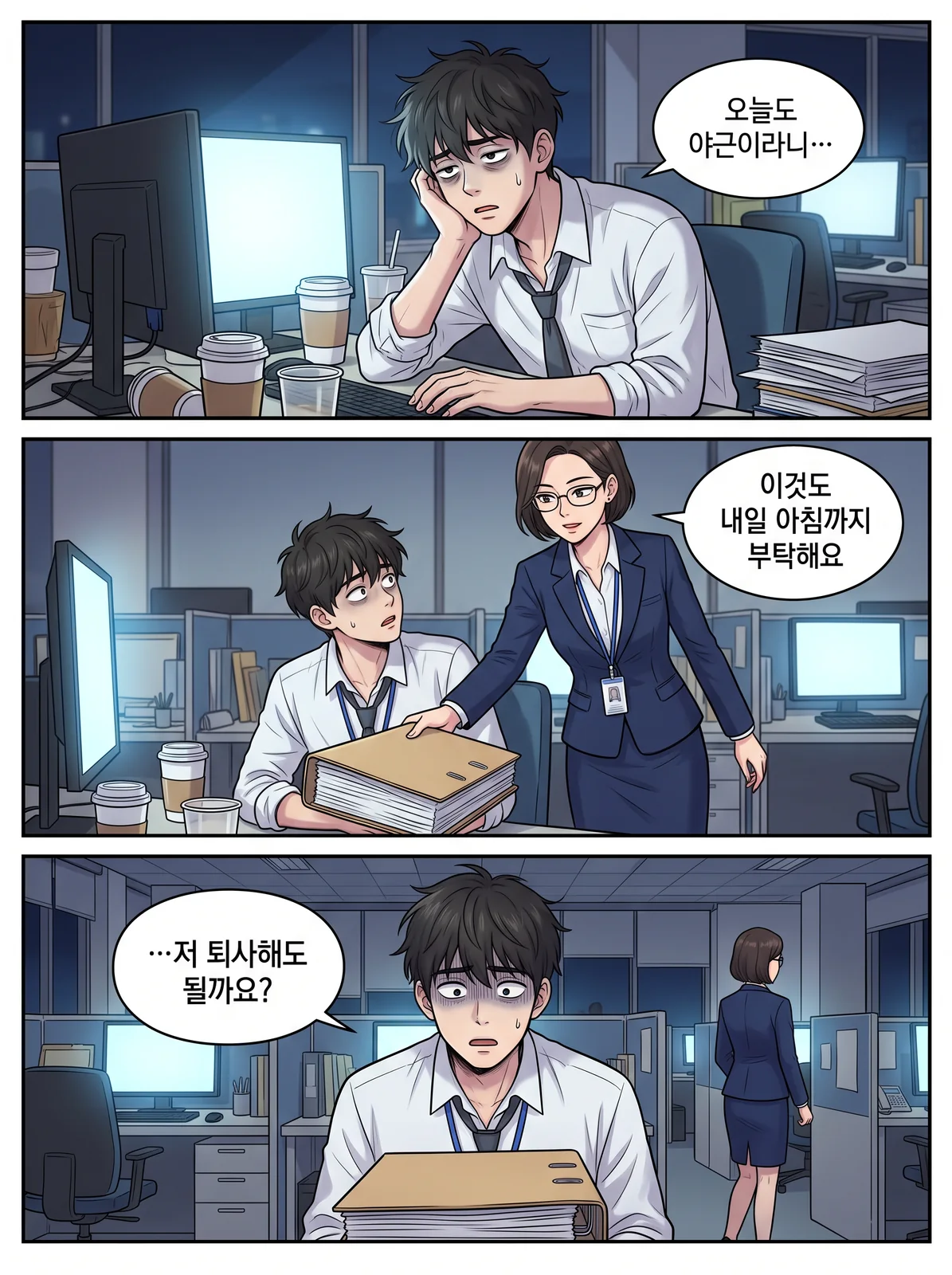
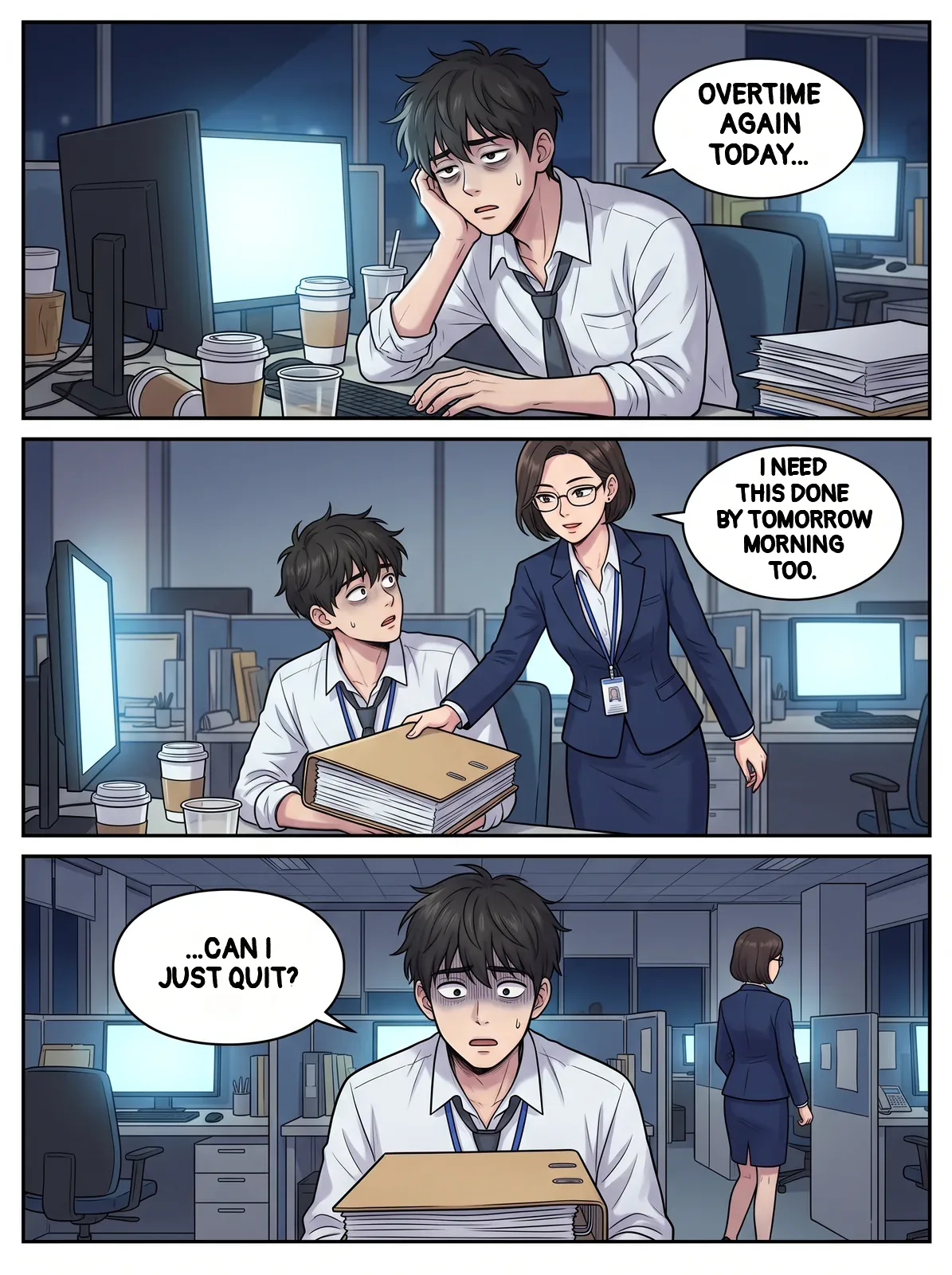
Tips for cleaner manhwa translations
- Keep the original resolution. Webtoon images are often only 690–800 pixels wide; don't shrink them further.
- Check the first page of each episode. Recaps and title cards often use decorative fonts that OCR reads less reliably.
- Text over artwork is harder than text in bubbles. Narration boxes and floating thoughts over detailed backgrounds can show faint traces after clean-up.
- Sound effects usually stay as drawn. Stylized Korean sound effects are part of the art and are left in place.
Frequently asked questions
What languages can I translate manhwa into?
Twenty-seven, including English, Spanish, Portuguese, Indonesian, Vietnamese, Thai, French, German, Japanese and Chinese.
Can I upload a whole webtoon episode as one image?
Yes. A strip tens of thousands of pixels tall is translated as one image: text is found in overlapping pieces at full resolution and the whole strip comes back in one piece. Keep the file under 10 MB.
How much does it cost?
One image is one page credit. Page packs start at $4.99 for 100 pages and go down to $0.01 per page, and new accounts get 3 free pages.
Does it also translate Japanese manga and Chinese manhua?
Yes. Japanese, Korean, Chinese and English source text is detected automatically. See How to Translate Manga to English for a Japanese walkthrough.