2026-11-14 · AI Manga Translator
Translating Long Webtoon Strips Without Cutting Bubbles in Half
Why AI translators leave webtoon strips half translated, split speech bubbles and leave English behind, and how we rebuilt long-strip translation: overlapping detection pieces, one translation pass and bubble-wide cleaning, with before-and-after examples.
A webtoon chapter is often a handful of images, each 900 pixels wide and 16,000 pixels tall. Translate one with a tool built for manga pages and you get one of three results: only part of the strip comes back translated, a speech bubble is split between two translations, or a bubble ends up with Chinese in the middle and English letters still sticking out at the end of the line.
Our own browser extension did all three. This post walks through each failure, what caused it, what we tried, and the approach we shipped: translate the strip as one image, find the text in overlapping pieces, translate every line of the strip in one request, and clean the whole inside of each speech bubble. Every example below is from the same real chapter, translated into Simplified Chinese.
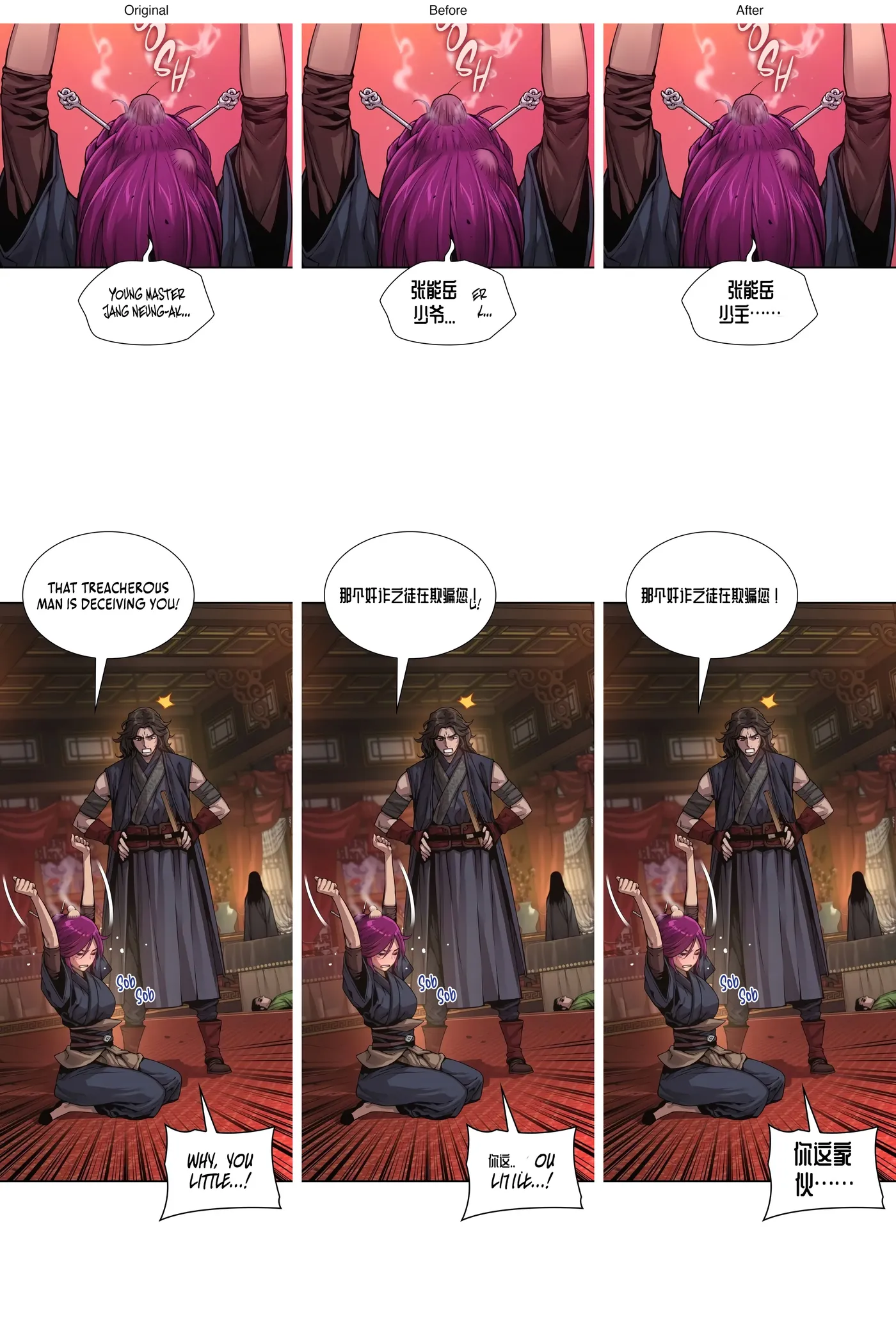
Look at the "Before" column: "ER" and "K…" next to the name, a stray "U!" after the second line, "OU LITTLE" under the last one. The "After" column is the same strip translated by the version we ship now. The rest of this post explains what it took to get there.
Why long strips are hard
AI manga translation runs a chain of steps: find the text, read it (OCR), translate it, erase the original lettering, and letter the translation back in. We build on the open-source manga-image-translator pipeline for those steps.
The text detector works on an image about 2,048 pixels on its long side. A 900 × 16,000 strip scaled to that size is 115 pixels wide, and the lettering disappears. Every tool has to work around that limit, and the workaround decides what goes wrong.
Problem 1: half of the strip came back translated
What we saw: after clicking translate, some parts of the strip were in Chinese and others were still in English, and the result changed as the reader scrolled.
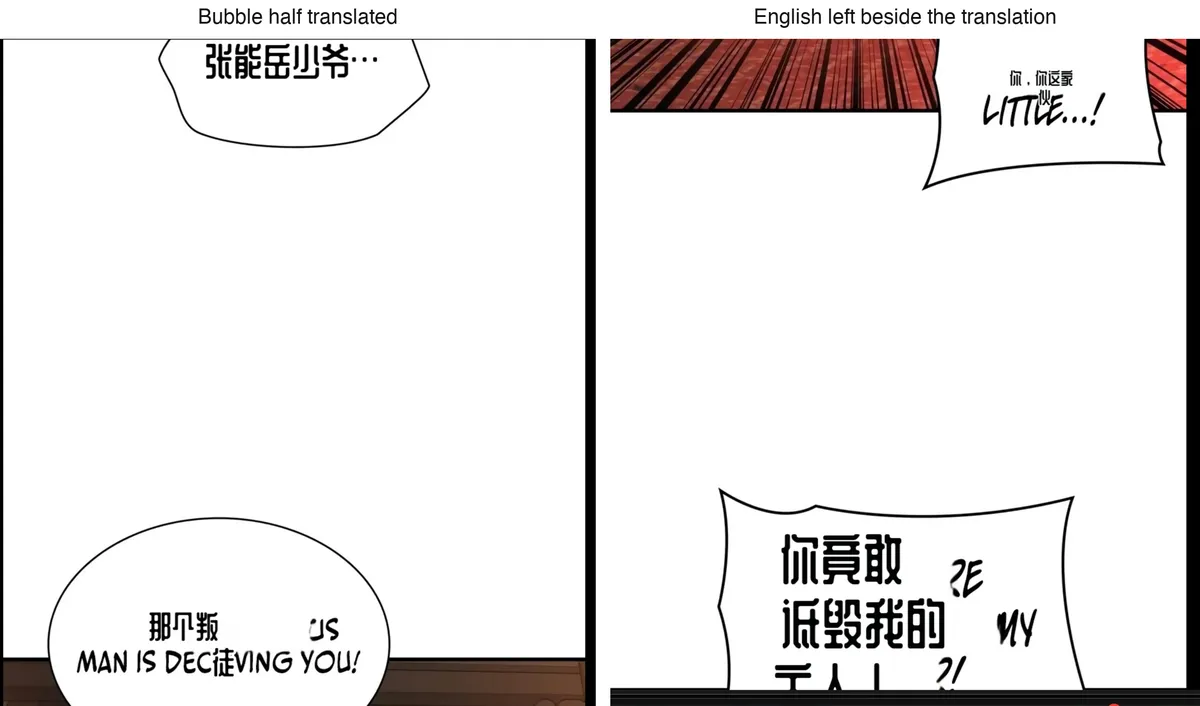
Why: our first extension cut each tall image into slices in the browser, sent only the slices near the screen to save the reader's credits, and pasted each translated slice back into the strip as it arrived. Nothing guaranteed that a whole image was ever finished, and a slice could take close to a minute.
Problem 2: a speech bubble cut in two
What we saw: some bubbles came back with half a sentence.
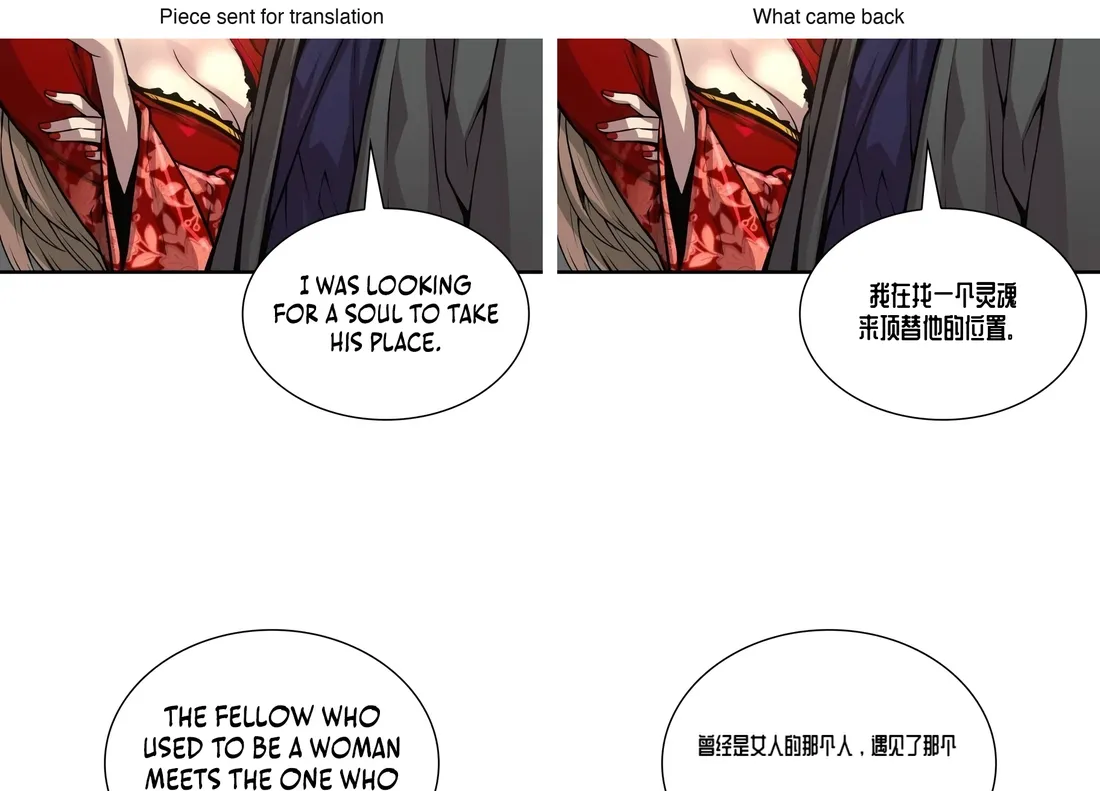
Why: the slicer looked for a calm row to cut at, but it measured rows on a copy shrunk to 160 pixels wide, where a speech bubble's thin outline almost vanishes. The white inside of a bubble looked like a gap between panels, so the cut went straight through it, and each half was translated on its own.
We first fixed the slicer to cut only in the middle of tall, fully blank bands. That stopped the split bubbles, but it treated the symptom: as long as the browser cuts the strip, every cut is a chance to break a bubble, a line or a name.
Problem 3: a name turned into nonsense
What we saw: the bubble "YOUNG MASTER JANG NEUNG-AK…" came back as "YOU'唐 MASTER 能岳……": half English, half a garbled name.
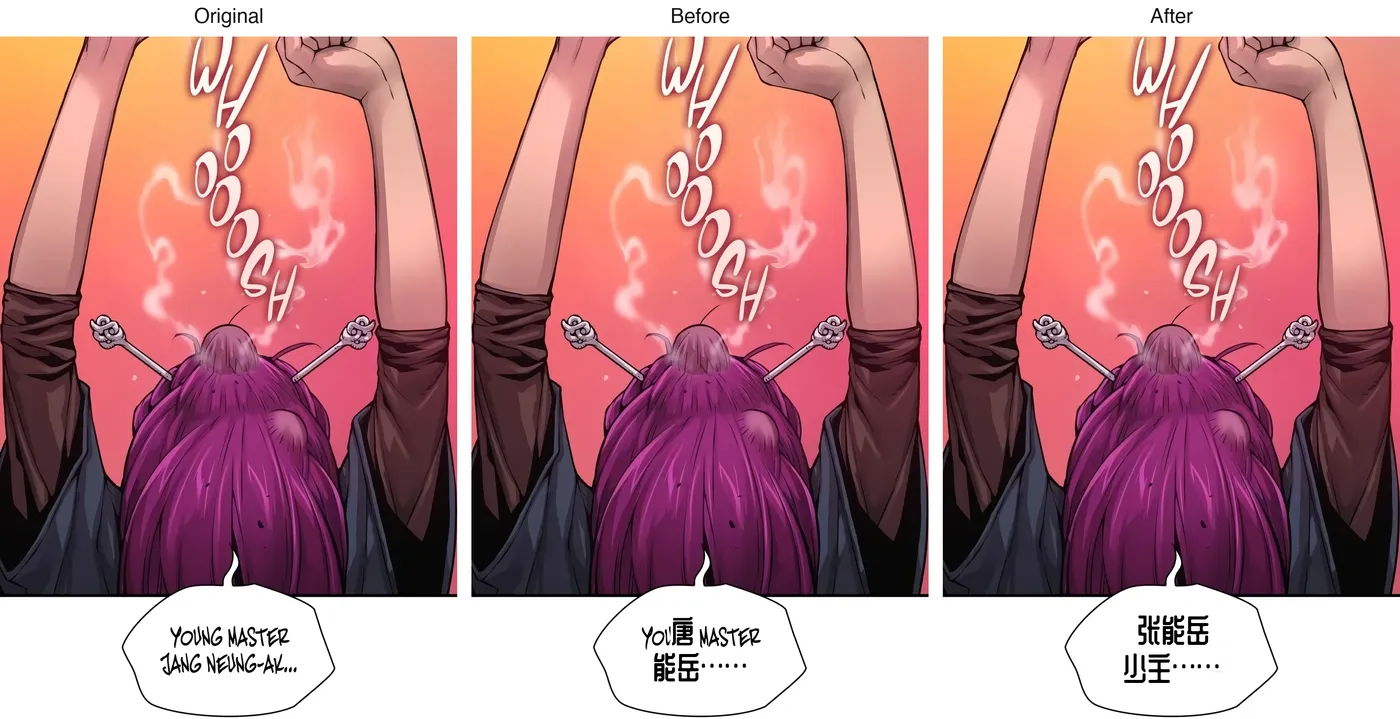
Why: this was a detection problem, not a translation one. We ran the same slice through our pipeline at several detection sizes and logged what the OCR read:
| Detection setting | What was read |
|---|---|
| 2,048 px (our default), slice 1,648 px tall | Only "TANG NEUNG-AK" — the first line was missed and J was read as T, which became 唐 |
| 1,536 px | Both lines here, but on other slices it dropped the second line of a bubble |
| The slice's own size | Every line, "YOUNG MASTER JANG NEUNG-AK" |
Scaling a slice up to 2,048 pixels blurred the thin hand lettering enough to lose a whole line. Across nine real slices, detecting each one at its own size, never above 2,048, read every line except on one very tall slice.
Problem 4: English left at the end of lines
What we saw: with every line found, bubbles still kept fragments of English: "ER", "OU LITTLE", "MY ?!".
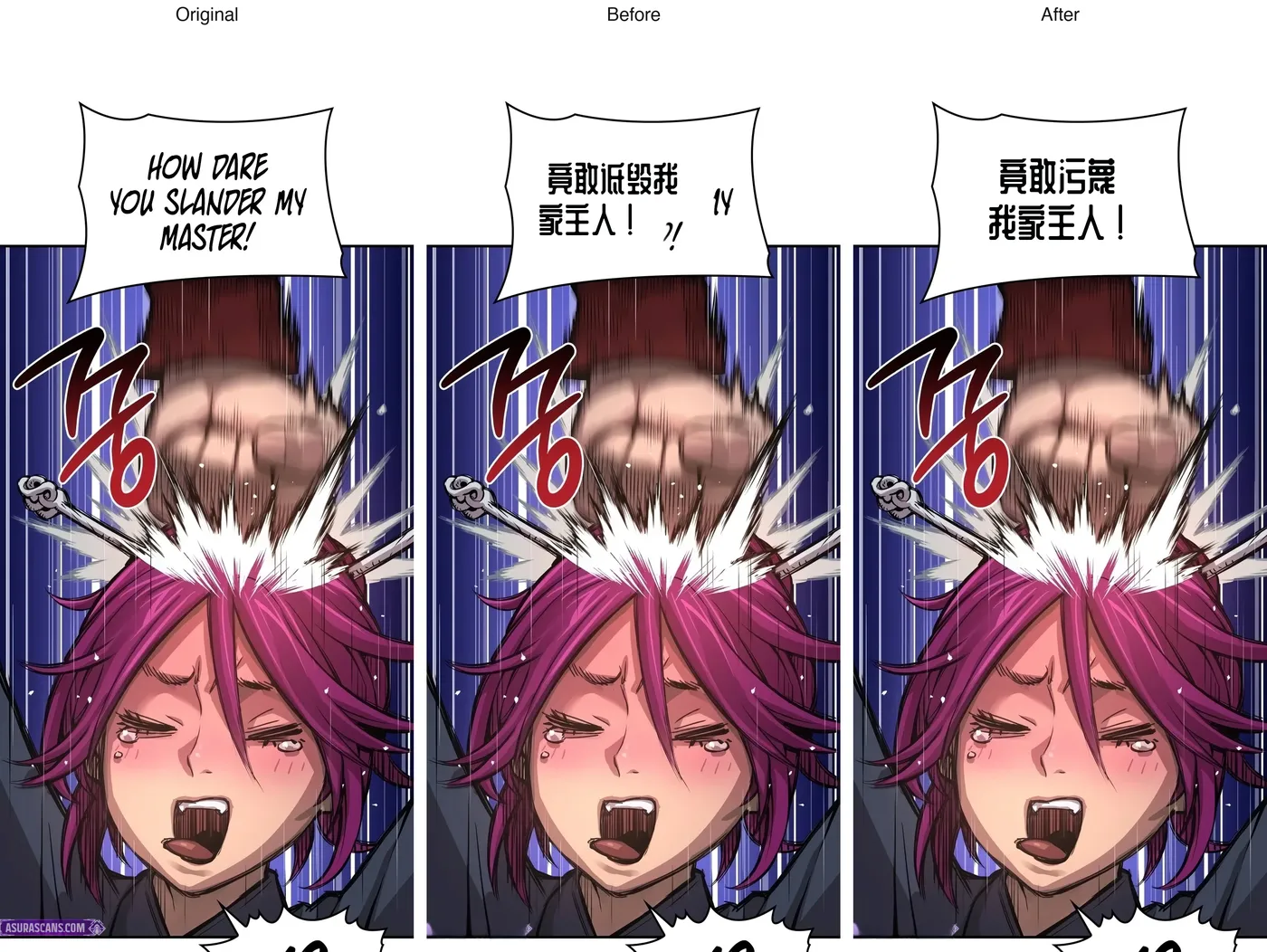
Why: for this condensed hand lettering, the detector's boxes often covered only the left part of a line. Whatever was outside the box was neither read nor erased. We tried the usual settings first: wider boxes (an unclip ratio of 2.8 and 3.2) made the OCR misread names again, and lower text thresholds (0.3 and 0.2) lost whole lines. Neither fixed the leftovers.
The approach we shipped
Torii, a manga translator that has published a detailed write-up of its pipeline, translates a strip as one image at full resolution: it cuts the strip into overlapping pieces only to search for text, then joins any bubble a cut went through. We adopted the same idea and added our own cleaning step.
- The whole image goes to the server. The extension no longer cuts anything. Each image is sent once and swapped in once, when it is done.
- Text is found in overlapping pieces. For any image taller than 2.5 times its width, the server searches pieces about 1.6 widths tall (never over 2,048 pixels), each overlapping the next by about a third of a width, and each detected at its own size, the setting that read every line in Problem 3.
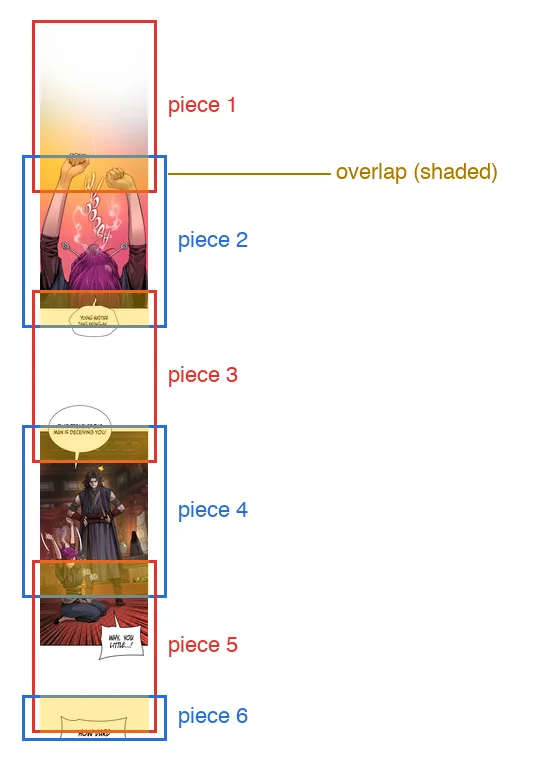
- Lines cut by a piece edge are dropped, then rejoined. The overlap is taller than a line of lettering, so a line cut at one piece's edge is found whole in the next. Duplicates from the overlap are removed, and the lines are mapped back onto the full strip, where the normal steps group them into bubbles again.
- One translation request for the whole strip. Every line goes to the model together, in reading order, so a name is translated the same way at the top and the bottom of the chapter.
- Bubbles are cleaned completely. If a white speech bubble contains text we translated, every dark pixel inside its outline is erased, whether the detector boxed it or not. That is what removed the leftover letters in Problem 4. Text on other plain backgrounds is erased with a margin that grows with the size of the lettering.
- Only the parts with text are repainted. The repainting model also expects about 2,048 pixels, so instead of shrinking the strip, we repaint each band that contains text, at full resolution.
One idea we tried and dropped: rebuilding the text lines from the dark pixels inside each bubble. It found more text on some runs and lost whole lines on others, so we kept the detector's lines for reading and used the bubble only for cleaning.
The result
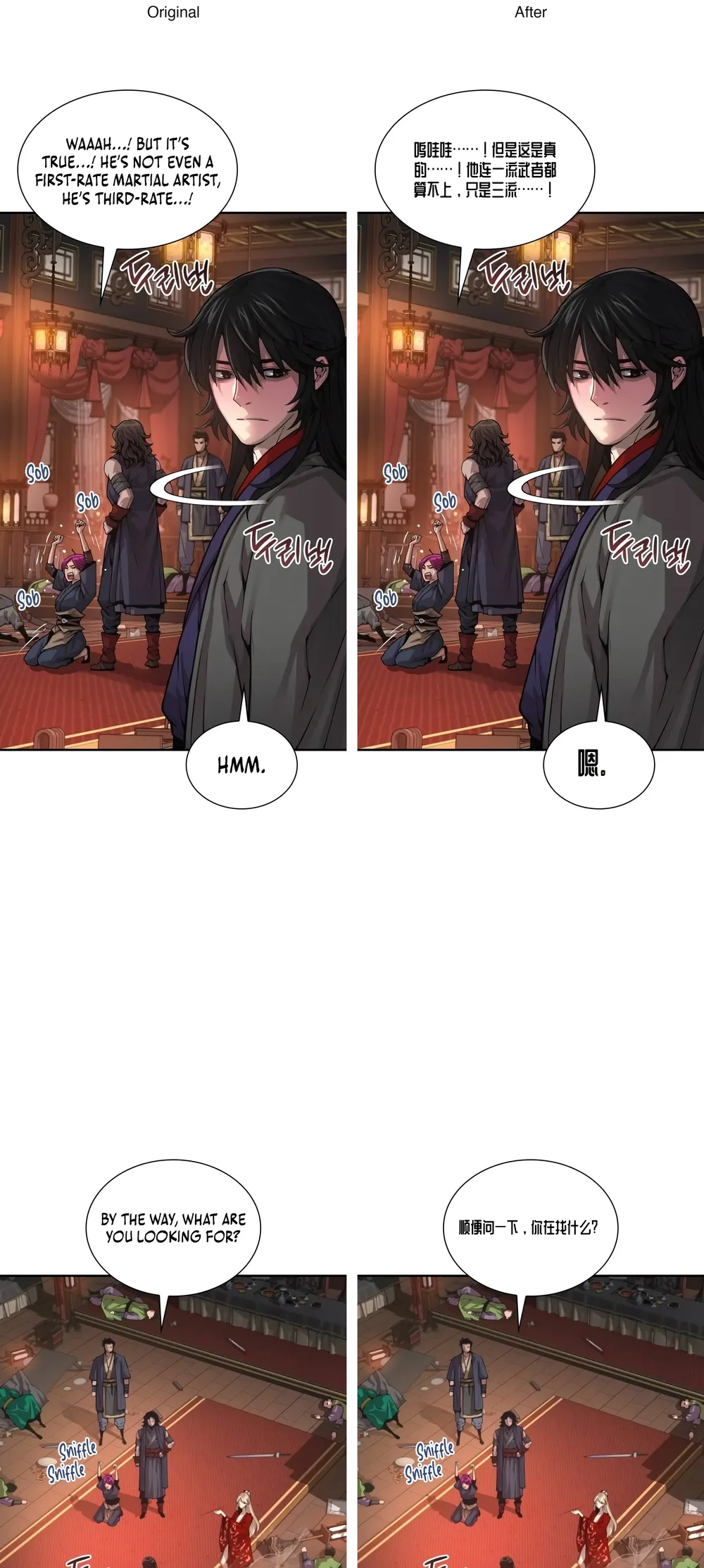
On two 900 × 16,000 strips from the test chapter, the server found 30 and 24 lines, translated every dialogue bubble, and left no English in them. Each strip took 85 to 180 seconds, including the time to start a GPU. We also re-ran two of our regular sample pages to check that ordinary manga pages still come out clean, and they do.
What still isn't perfect
- Sound effects drawn over the art ("Sob", "Sniffle") are left as they are. Translating them is next on our list.
- Speed. A strip takes a minute or more on our side; the extension starts the next image before you reach it, but a fast first result is still ahead of us.
- Text size in large bubbles could be bigger. The layout picks one size per page and is cautious in roomy bubbles.
How to check any translator on a long strip
- Look at the bubbles near the bottom and top of each image, and anywhere a tool might have cut. Half sentences give a cut away.
- Read the end of every line. Leftover letters at line ends mean the lettering was only partly detected.
- Follow one name through the chapter. If it changes spelling, the strip was translated in pieces without shared context.
- Check the meaning of one emotional line, the kind with "not even" or "only". Reversed meanings are easy to miss when the page looks clean.
Try it
Install the AI Manga Translator browser extension and click the translate button on a webtoon chapter: each strip is translated as one image and swapped in when it is finished. For files on your device, you can also upload a whole strip on the translator as one image of up to 10 MB.
Frequently asked questions
Can I translate a whole webtoon episode as one image?
Yes. Images taller than two and a half times their width are searched for text in overlapping pieces and translated as one image, so you don't need to cut the strip first.
Why did my strip come back only partly translated?
Tools that cut a strip in the browser translate the slices separately and paste them back. If you see half-translated strips or half sentences, the strip was cut. Our extension now sends each image whole.
Which language was used for the examples?
The examples translate an English webtoon into Simplified Chinese, because that is where we found these problems. The same steps run for every target language.