2026-11-23 · AI Manga Translator
Manga OCR Tested: manga-ocr vs Tesseract on Vertical Japanese Speech Bubbles
We ran two free OCR tools on 12 speech bubbles from our own manga pages. manga-ocr got 1 character wrong out of 133; Tesseract got about half wrong and lost a whole bubble on the full page. What that means for learners, readers and translators.
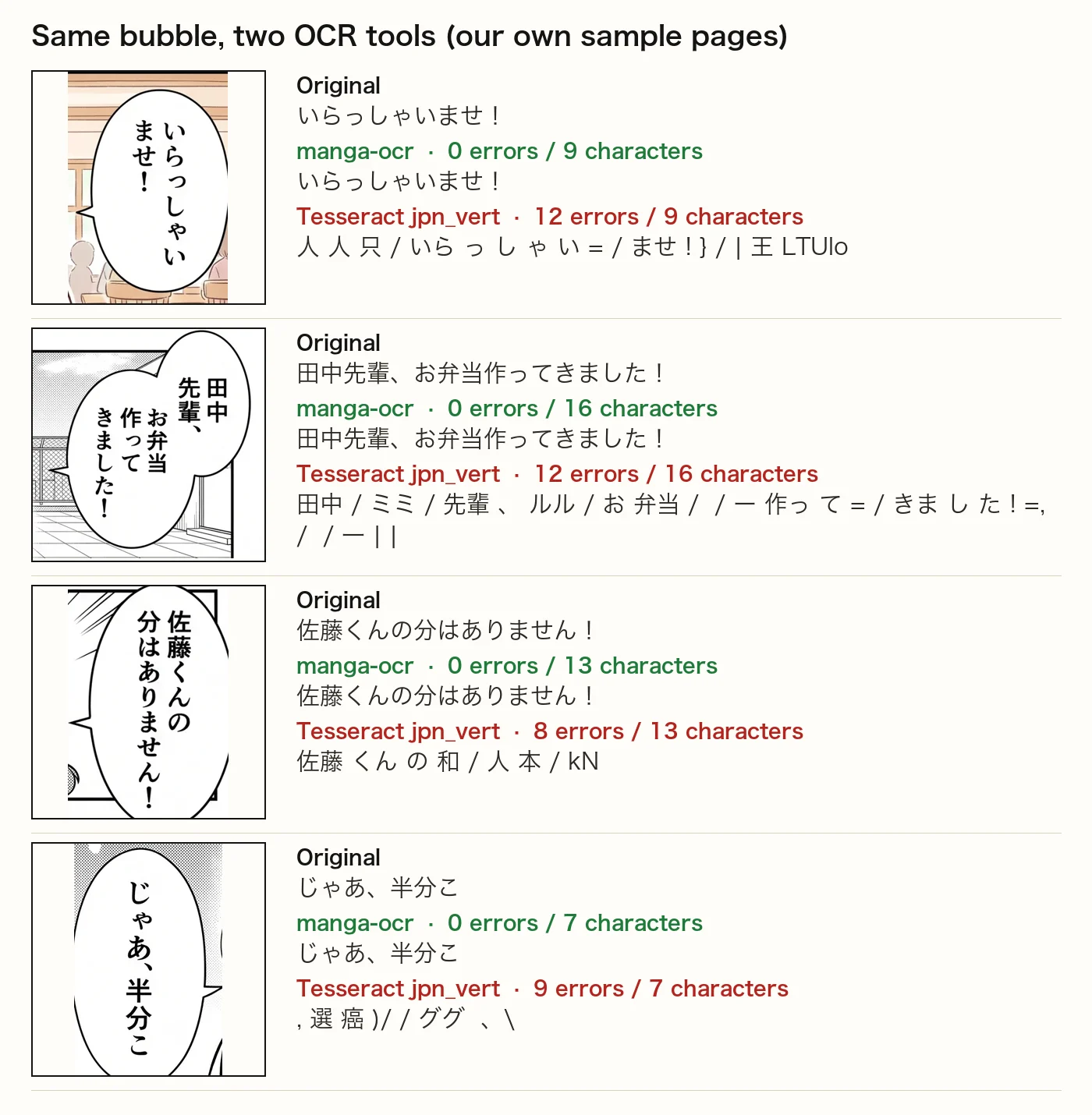
Copy Japanese text out of a manga page and the first tool most people try is a general OCR engine. Point it at a speech bubble and you get something like 人 人 只 / いら っ し ゃ い = / ませ ! } for a bubble that simply says いらっしゃいませ! ("Welcome!").
We wanted to know how far apart the free options really are, so we ran the two most common ones on the same bubbles and counted every wrong character. manga-ocr read 132 of 133 characters correctly. Tesseract's vertical Japanese model got about half of them wrong, and on a full page it skipped one bubble entirely. Below is how we tested, where each tool fails, and which one to use for what.
What makes manga hard for OCR
A manga speech bubble breaks most of the assumptions a document OCR engine is built on:
- Vertical text, read right to left. Columns run top to bottom, and the rightmost column comes first.
- Short columns of a few characters. A bubble may hold three columns of four characters each, so there is little context to correct a misread.
- Small kana that matter. っ, ゃ and ゅ are smaller versions of normal characters and change the word.
- Art around the text. Bubble outlines, tails, screentone and panel borders sit right next to the letters, and a general engine tries to read them as characters.
- Hand-drawn or display fonts. Shouts, thoughts and narration use different typefaces, often bold and tightly spaced.
A tool trained on comic lettering sees these patterns in training. A tool trained on scanned documents does not, so it guesses.
How we tested
We used 12 speech bubbles from three of our own sample pages (the same pages shown on our homepage, drawn for this site): four from a café scene, four from a school lunch scene and four from a train-station scene. Together they hold 133 characters of vertical Japanese, including small kana, a kanji name (田中, 佐藤), an ellipsis and exclamation marks.
- manga-ocr 0.1.16, the open-source model by kha-white that is the top result for "manga ocr" on Google. It reads a cropped bubble in one pass, including multi-line text.
- Tesseract 5.5.4 with the official
jpn_vertlanguage data, in single vertical block mode (--psm 5). - Both ran on the CPU of an Apple M3 Pro laptop, on 23 November 2026.
- Each tool got the same crop: the bubble plus a little margin, cut by hand.
- We scored the character error rate: the number of characters you would have to insert, delete or change to turn the output into the original text, divided by the length of the original. Spaces were ignored, full-width and half-width punctuation were treated as the same, and
...counted as….
The results
| manga-ocr | Tesseract (jpn_vert) | |
|---|---|---|
| Bubbles read perfectly | 11 of 12 | 1 of 12 |
| Character errors | 1 in 133 (0.8%) | 66 in 133 (49.6%) |
| Time per bubble on CPU | 0.17 s | 0.23 s |
| First run | 93.5 s to download and load the model (about 450 MB) | instant |
manga-ocr's one mistake was an ellipsis: …ありがとう came back as :ありがとう. Every kanji and every small kana was right.
Tesseract's errors were of three kinds, and they show up in the image above:
- It read the art as text. Bubble outlines became
|,/and\, screentone became人 人 只, and the edge of a panel becamekN. These extra characters are why a short bubble can have more errors than characters. - It split and scrambled columns. 田中先輩、お弁当作ってきました! came back in seven fragments with invented characters (
ミミ,ルル) between them. - It missed lines it could not separate. じゃあ、半分こ ("Then let's split it") became
, 選 癌 )/ / ググ: not one correct character.
Only one bubble, 寒いのは苦手なんだ, came out of Tesseract perfectly: clean black text, two columns, plenty of white space.
A full page is worse
We also gave Tesseract the whole lunch page in automatic layout mode. It never found the first bubble (田中先輩、お弁当作ってきました!) at all, dropped the opening line of the second (えっ、俺に?) and the last line of the third (一個ちょうだい). Only the fourth bubble came back complete. manga-ocr cannot be tested this way, because it expects a single bubble: it has no step that finds the bubbles on a page.
That is the real division of labour. Finding the text (detection) and reading the text (recognition) are separate problems, and good results need both.
Which tool to use
If you are learning Japanese and want to look up words in a bubble, manga-ocr is the right tool. It is free, runs on a laptop without a GPU after a one-time download, and tools built on it let you draw a box around a bubble and copy the text into a dictionary. The trade-off is that you crop each bubble yourself.
If you want to read a chapter in your language, OCR is only the first of five steps. The text also has to be found on the page, translated with the whole page as context, erased from the art, and lettered back into the bubble. Doing that by hand for every bubble of a 40-page chapter takes hours. A page translator does all five steps; we described each one in how AI manga translation works, and the lettering step in manga typesetting.
If you are building a tool, pair a text detector with a comic-trained recognizer. Our own translator uses the open-source manga-image-translator pipeline: a detector finds every text line on the page, and an OCR model trained on comic lettering reads each one before anything is translated. A general OCR engine in that position would pass the translator fragments like the ones above, and no translation model can recover a sentence from , 選 癌.
When Tesseract is fine: horizontal printed text on a clean background, such as a title page, a sign photographed straight on, or digital captions. It is fast, small and already installed on many systems.
Limits of this test
This was a small, clean test. Twelve bubbles from three pages is enough to show the size of the gap, not to rank tools to a decimal point. Our pages use clear lettering and no furigana; heavily stylised sound effects, very small text, low-resolution scans and furigana-heavy pages for younger readers will all raise the error rate for every tool. We did not test commercial OCR services, phone camera apps or browser extensions, and we did not tune Tesseract beyond choosing the vertical model and the page segmentation mode.
A quick check you can run yourself
Before you trust any OCR on manga, take five bubbles from the chapter you actually read and check:
- Are small kana (っ, ゃ, ゅ, ょ) correct?
- Are columns in the right order, right to left?
- Does any bubble outline or screentone show up as
|,/or stray kanji? - Is any bubble missing when you run a whole page?
If the answer to the last three is no, the tool is good enough for your pages.
FAQ
What is the best OCR for manga?
In our test, manga-ocr: 1 wrong character in 133 across 12 vertical Japanese bubbles. It reads one cropped bubble at a time, so it needs to be paired with a way to select or detect the bubbles.
Can Tesseract read vertical Japanese?
It has a vertical Japanese model (jpn_vert), but on manga speech bubbles it got about half the characters wrong in our test, mostly by reading bubble outlines and screentone as text.
Does manga OCR work for Korean manhwa or Chinese manhua?
manga-ocr is trained for Japanese only. Korean and Chinese comics need an OCR model trained on those scripts; full page translators usually switch models by language.
Can I translate a manga page without copying the text out?
Yes. A manga page translator runs detection, OCR, translation, clean-up and lettering in one step and returns the finished page, so you never handle the raw text.